Preview before you apply
Every variant is listed with its current price, the new price and any warning before a single price changes. Nothing is written until you confirm exactly what you saw.
SafeSale for Shopify
Bulk sales and flash sales for Shopify with a dry-run preview, an immutable record of your original prices, automatic revert when the sale ends, and a one-click restore. No compounding discounts. No stuck prices.
Install from the Shopify App StoreWatch the 5-minute demo
14-day free trial · Starter $9.99/mo · Pro $19.99/mo · Billed by Shopify · No ads
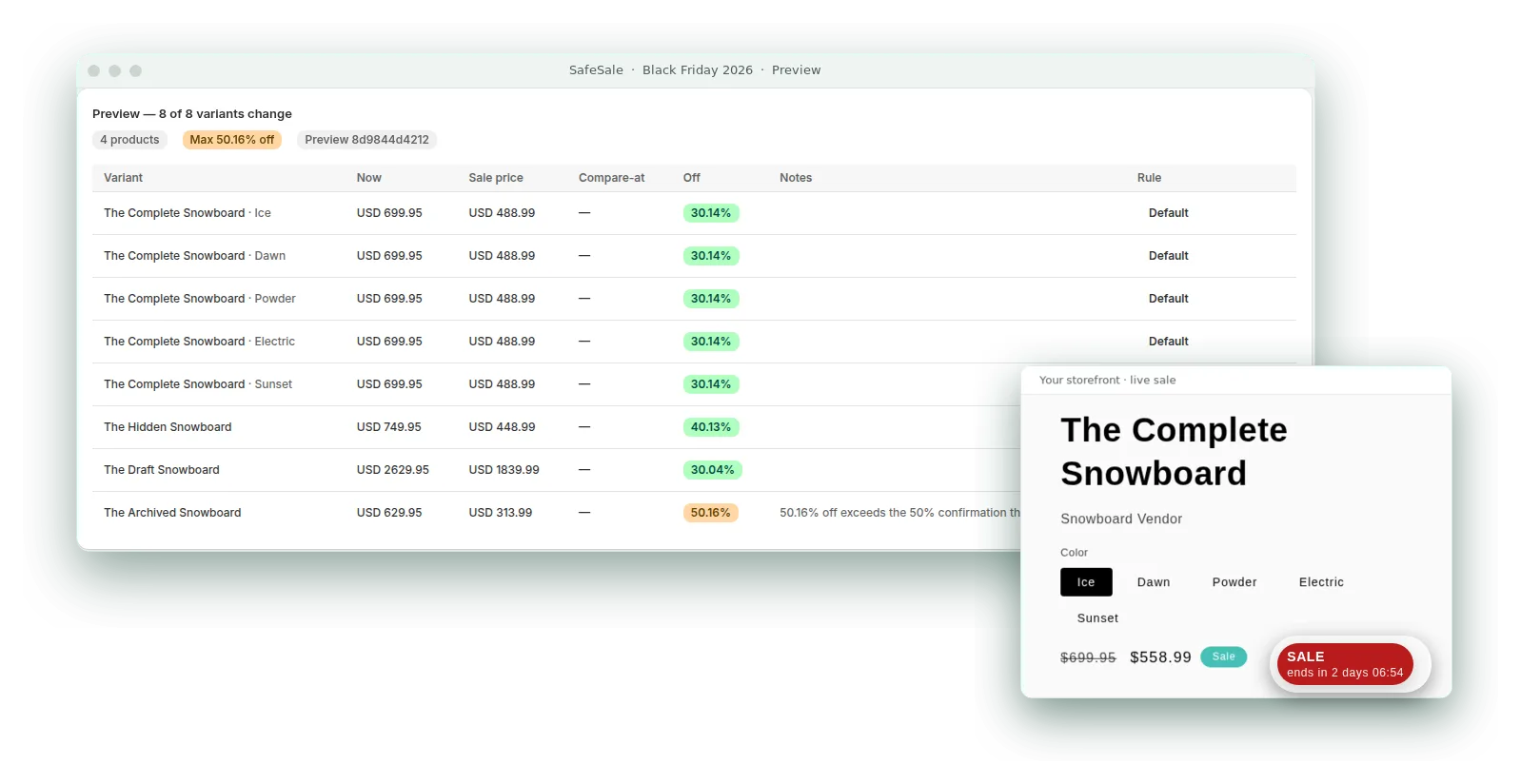
Every variant is listed with its current price, the new price and any warning before a single price changes. Nothing is written until you confirm exactly what you saw.
The first thing SafeSale does is snapshot the original price and compare-at price of every variant. Snapshots are immutable and are the only source every discount is computed from, so a 20% sale can never become 40%.
By default SafeSale uses Shopify automatic discounts, which never touch your stored prices and switch off exactly at the end time. If you opt into strike-through pricing, a retrying job restores the exact snapshot when the sale ends.
Restore a single sale or end everything and restore every price with one button. Every change is in an audit log you can export.
Some variants 20%, others 25%, others a fixed price: rules are resolved per variant and shown per variant in the preview.
Split visitors between up to five variants (no discount, 10% off, 20% off...) inside one checkout-discount sale. SafeSale assigns each browser once, applies only its variant's discount, and reports conversion and revenue per variant with a plain verdict and a one-click apply-the-winner.
Two flat plans with a 14-day free trial. No usage fees, no banners injected into your storefront or checkout, ever.
0
stored prices modified in the default automatic-discount mode
1 snapshot
per variant, taken before the first write, immutable for the life of the sale
90 days
snapshot retention after uninstall, restore never gated by a plan
0 ads
nothing added to your storefront or checkout that you did not enable
Recorded on a real development store
Five minutes with captions: a 20% automatic discount previewed, started and applied in checkout, then a snapshot-first price rewrite that lowers a $785.95 product to $589.46 and restores it to exactly $785.95 with its original $885.95 compare-at. No customer data, no orders placed.
New: A/B test the discount itself
Split visitors between up to five variants of one checkout-discount sale: no discount, 10% off, 20% off, a fixed price. Each browser is assigned once, sees and pays only its variant, and SafeSale reports visitors, orders, conversion, revenue and average order per variant with a plain verdict. One click applies the winner to everyone. No Shopify Rollouts setup, no third-party testing tool.
01
Target products, collections, tags or vendors. Choose percentage off, a fixed amount off or a fixed sale price, with optional rounding to .99. Pick the discount mechanism: a checkout discount that never touches stored prices (default) or a strike-through compare-at price rewrite. Set start and end, or start on confirm.
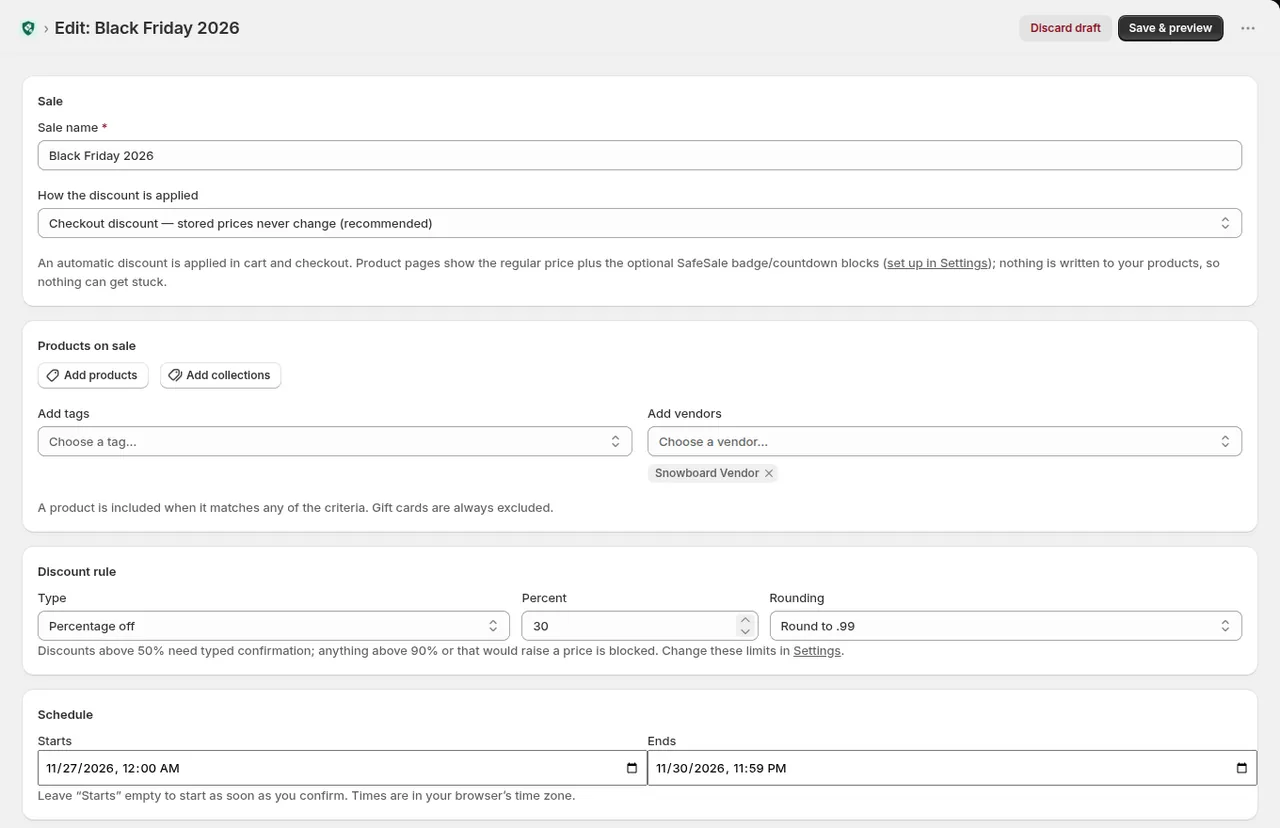
02
The preview lists each variant with its current price, sale price, compare-at and exact percentage off. Override the rule per variant for tiered sales. Anything above your confirmation threshold is flagged and needs the sale name typed before it can start; nothing is written until you confirm exactly what you saw.
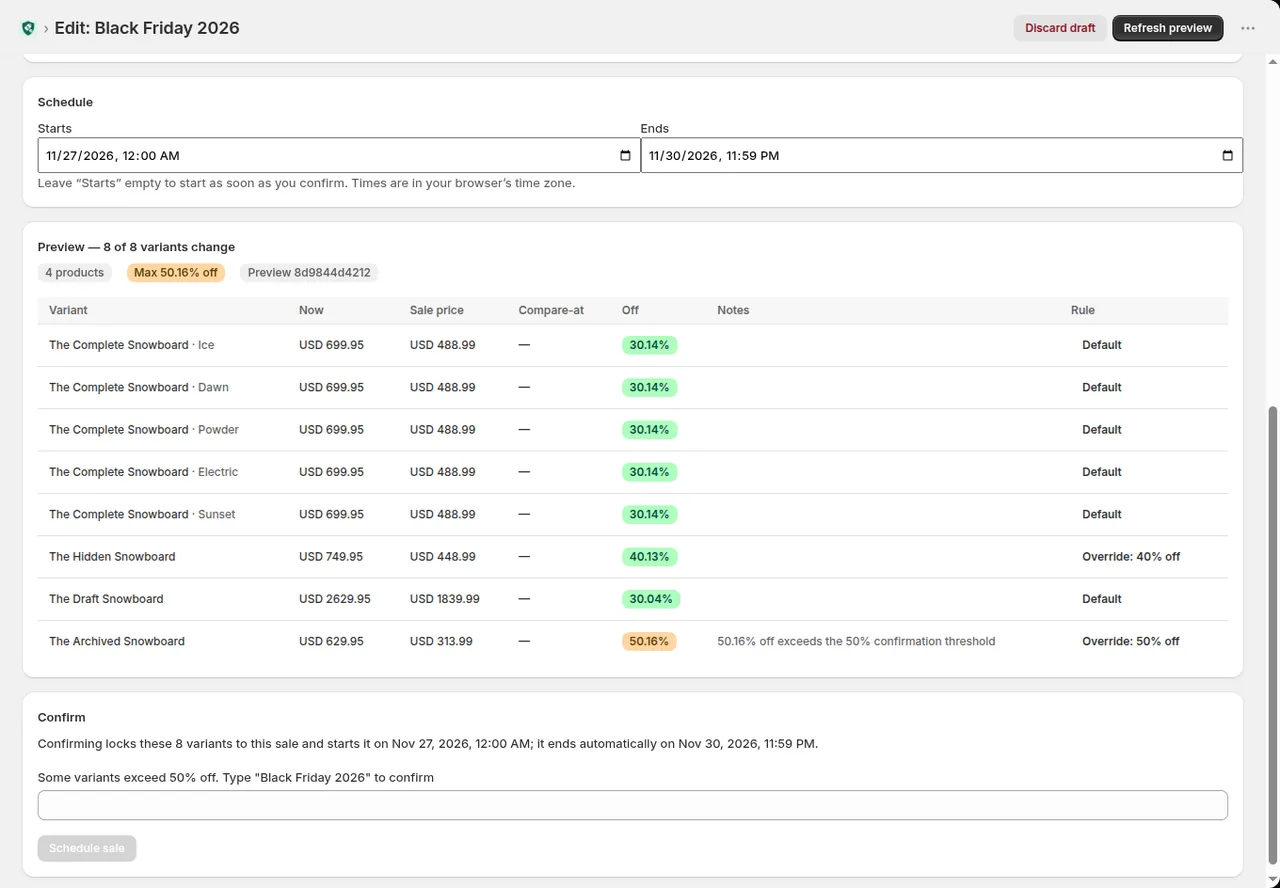
03
For strike-through sales SafeSale records the original price and compare-at of every variant before writing anything, then computes each sale price from that immutable snapshot. Every write is logged per variant, the snapshot is downloadable as CSV, and the end time is enforced by a retrying job.
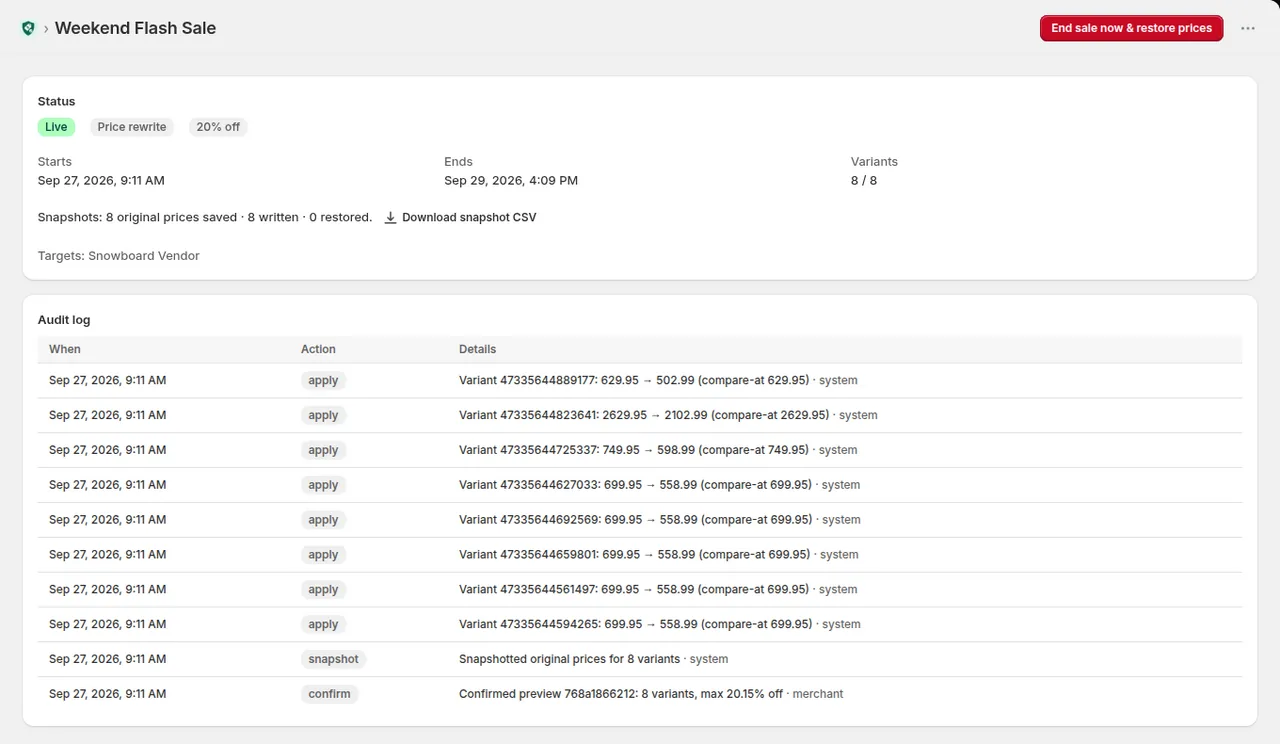
04
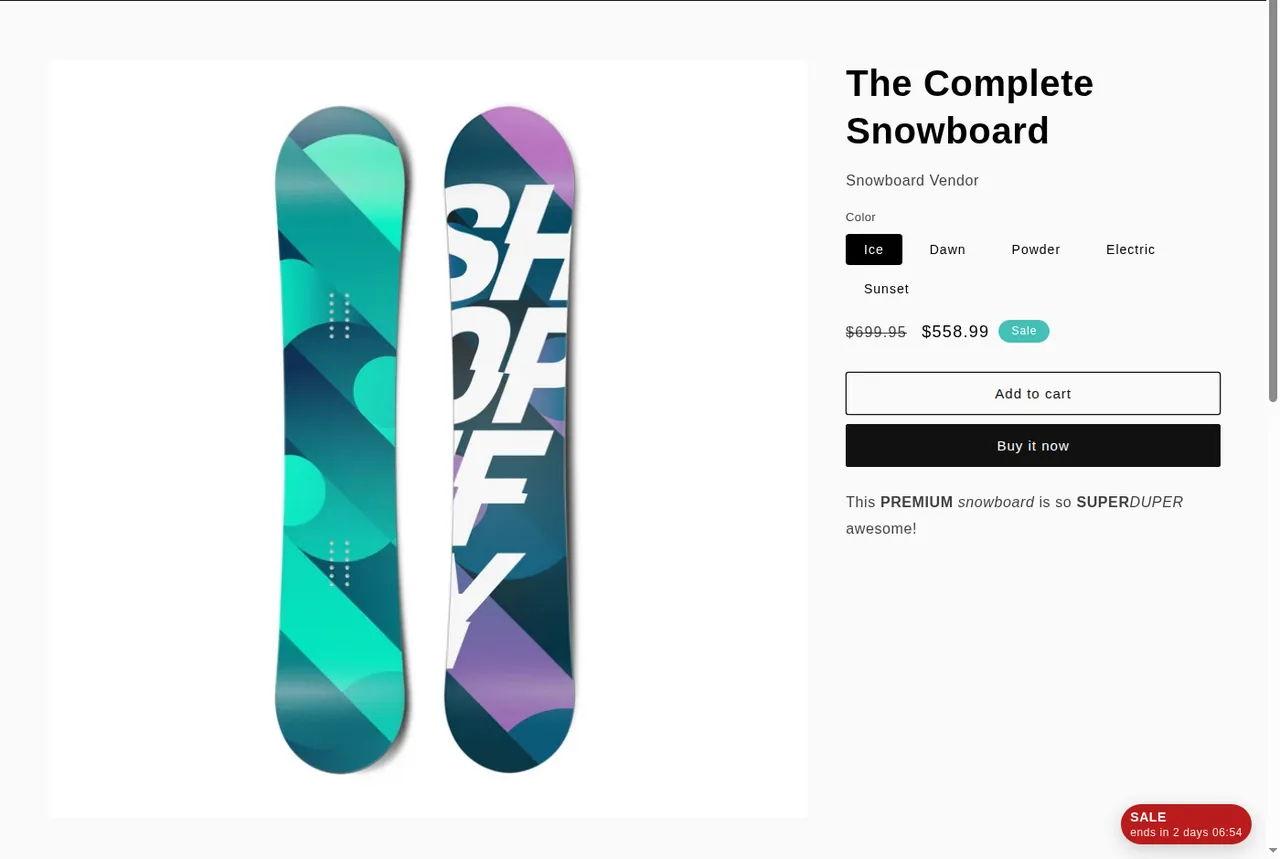
Price-rewrite sales show the original price crossed out natively in any theme. The optional Theme App Extension adds a sale badge and a live countdown to the end of the sale (not yet on Canvas-edited themes), with no theme code edits and nothing injected that you didn't enable.
05
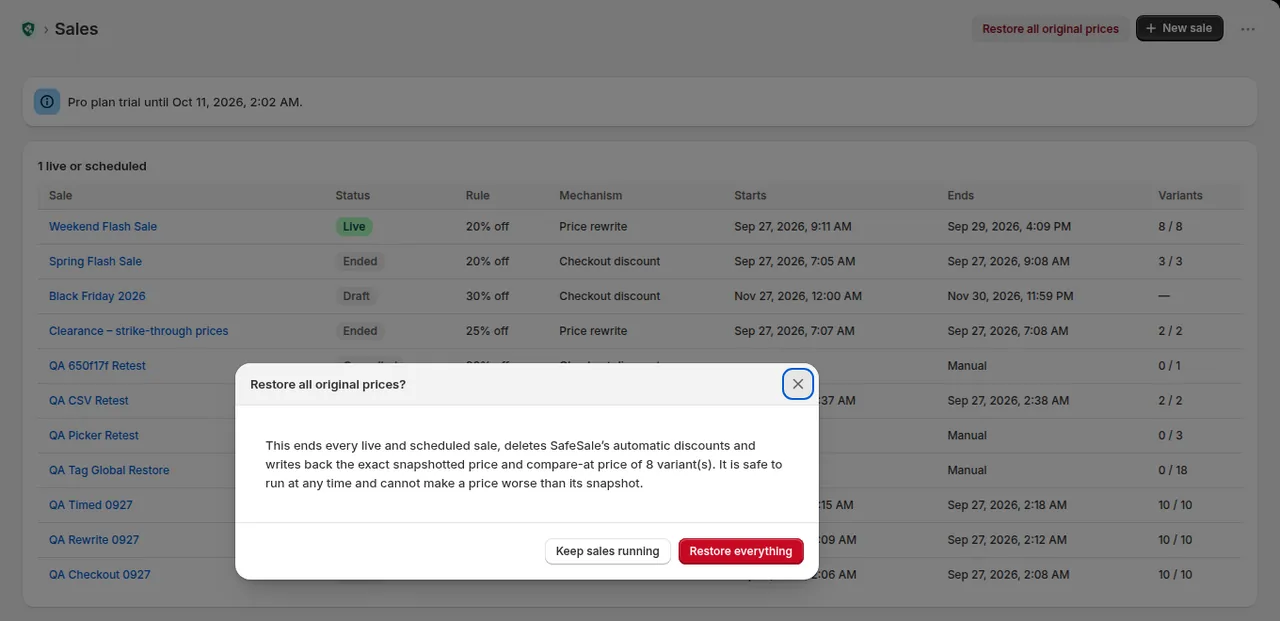
End a single sale and restore its prices from the sale page, or end every live and scheduled sale store-wide from the dashboard. Restore writes back the exact snapshotted price and compare-at, is safe to run at any time and can never make a price worse than its snapshot.
06
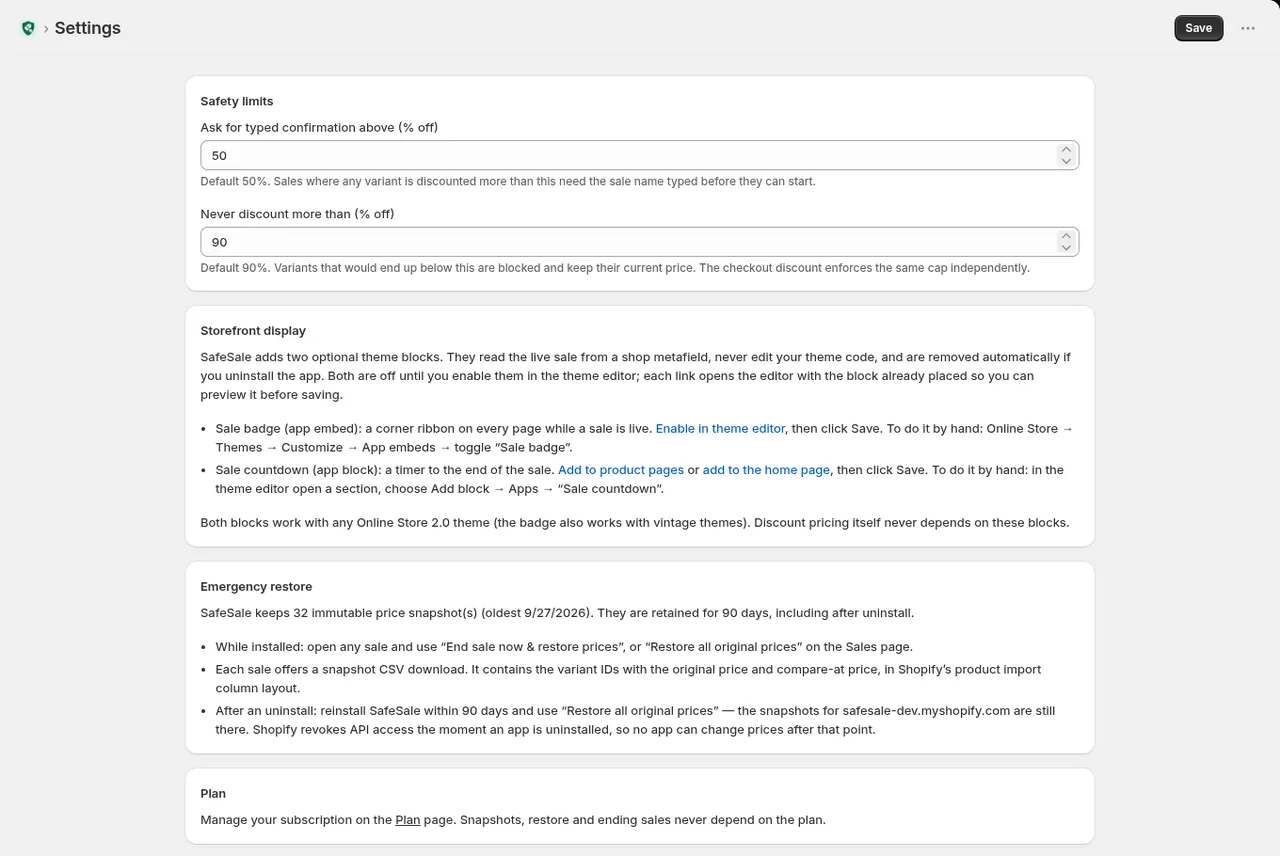
Set the discount level that requires typed confirmation and a hard cap that can never be exceeded. Snapshots are kept for 90 days, including after uninstall, so a reinstall can still restore your prices. The theme blocks are documented step by step and removed automatically on uninstall.
07
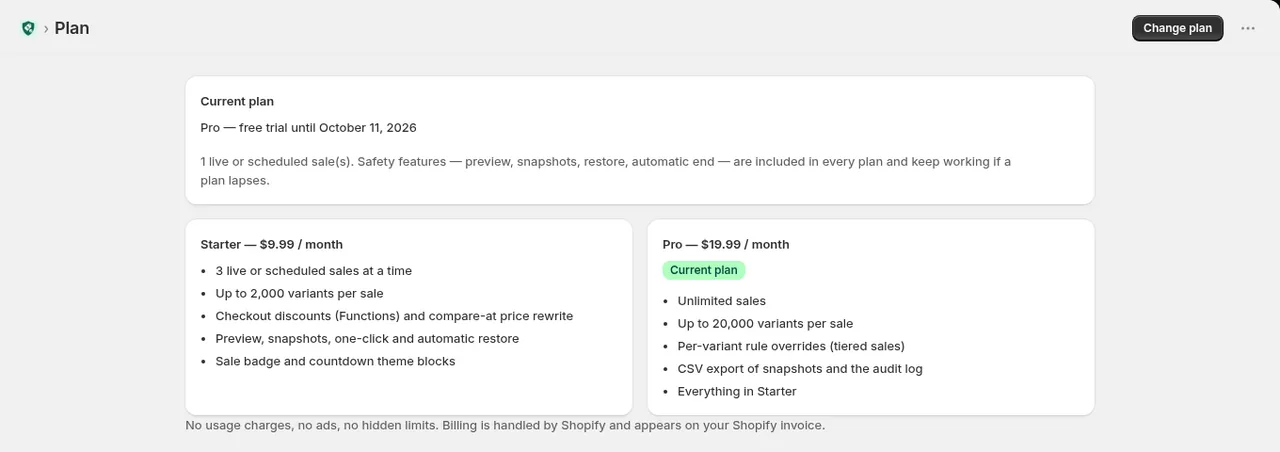
Starter at $9.99/month and Pro at $19.99/month, each with a 14-day free trial. Preview, snapshots, restore and automatic end are included in every plan and keep working if a plan lapses. No usage charges, no ads.
Most sale apps rewrite your variant prices in place and hope to write them back later. SafeSale runs sales as Shopify automatic discounts by default, so stored prices are never modified. If you opt into strike-through pricing, it snapshots every original price first, computes each sale price from that snapshot (so discounts can never compound), and restores the exact snapshot when the sale ends.
No. Sale prices are always computed from the immutable snapshot of the original price, never from the current price. A 20% sale stays 20% no matter how many times a sale is edited, restarted or overlaps another.
Automatic-discount sales are switched off by Shopify at the end time; there is nothing to restore. Price-rewrite sales are restored variant by variant from the snapshot by a job that retries on failure and records every write in the audit log. You can also end a sale and restore early with one click.
Shopify revokes an app's API access on uninstall, so no app can change prices after that. SafeSale asks you to end all sales first and keeps your snapshots for 90 days after uninstall. Reinstall and click Restore all original prices, with no plan required, or import the snapshot CSV in Shopify's product import format yourself.
Yes, when you choose the price-rewrite mechanism: the original price becomes the compare-at price and every theme shows it struck through. The optional theme app extension adds a sale badge and countdown timer without editing theme code.
Yes. Rules are resolved per variant, and the preview lets you override any variant individually, for example size XL at 40% while the rest is at 25%. A variant can only belong to one price-rewrite sale at a time, so overlapping sales are rejected instead of stacked.
Starter is $9.99/month and Pro is $19.99/month, both with a 14-day free trial and billed through Shopify. There are no usage charges and no ads. Preview, snapshots, restore and automatic end work on every plan, including a lapsed one.
Never. The only storefront elements are the sale badge and countdown blocks you enable yourself in the theme editor, and they are removed automatically when the app is uninstalled.
The sale itself, yes: automatic discounts run as a Shopify Function at checkout and price-rewrite sales change the prices themselves, so neither depends on your theme and both keep working on a Canvas theme. The optional sale badge and countdown blocks work with any theme edited in the standard theme editor, but themes with the Canvas badge (created with New or Duplicate in Canvas) can't use app blocks or embeds yet; Shopify has said support is coming. To use the blocks today, enable them on a theme without the badge: your original theme, or a copy made with Duplicate rather than Duplicate in Canvas.
SafeSale is a new app and does not have public reviews yet. Every screenshot and the video on this page are real captures from our development store, not mock-ups. If you run a sale with SafeSale and something is unclear, e-mail us and a person who wrote the code will answer.